What Layer Height Should I Choose for FDM 3D Printing
Andrew Ng2026-07-14T15:54:34+10:00What Layer Height Should I Choose for FDM 3D Printing?
0.1 mm, 0.15 mm or 0.2 mm? Layer height changes visible layer lines, surface finish, print time and price. Here is the practical choice for most FDM customers.
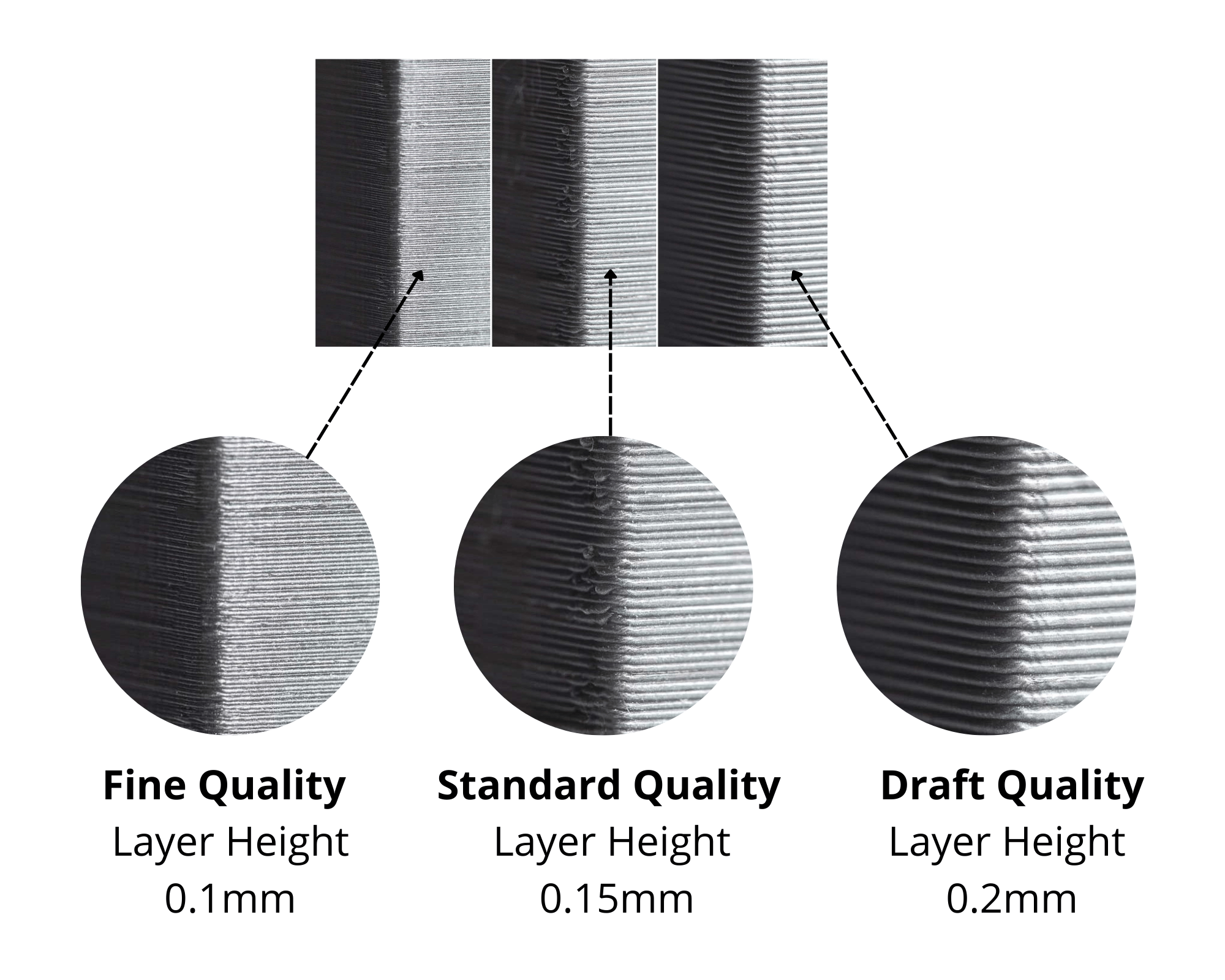
Visual comparison of 0.1 mm fine, 0.15 mm standard and 0.2 mm draft FDM layer heights.
In this article
When ordering an FDM 3D printed part, layer height is one of the easiest specifications to overthink. Customers often assume the smallest number automatically means the best part. In practice, the right layer height depends on what the part needs to do and which surfaces matter visually.
For most functional prototypes and production parts, 0.15 mm is our standard recommendation. It gives a clean surface, good detail and a sensible manufacturing time. A finer 0.1 mm layer height is useful when appearance or small vertical details matter, while 0.2 mm is often the better value for larger functional parts.
The photo above shows the difference directly. The geometry is similar, but the visible layer texture becomes more pronounced as layer height increases.
What Is FDM Layer Height?
FDM printers build a part one horizontal layer at a time. Layer height is the thickness of each printed layer in the Z direction.
A 0.1 mm setting uses thinner layers and therefore requires more layers to reach the same overall height. A 0.2 mm setting uses thicker layers and reaches the same height with fewer layers.
This is why finer layer heights generally improve the appearance of slopes, curves and angled surfaces, but also increase print time. Layer height is mainly a balance between surface finish, geometric detail, production time and price.
0.1 mm vs 0.15 mm vs 0.2 mm Layer Height
0.1 mm — Fine Quality
Finer visible layers for cosmetic parts, curved surfaces and geometry where small Z-axis details are important.
Best for appearance and fine vertical detail
0.15 mm — Standard Quality
Our balanced general-purpose option. Clean finish, good detail and practical production time for most customer parts.
Recommended for most FDM orders
0.2 mm — Draft / Functional Quality
Faster and more economical for larger components, brackets, fixtures and parts where visible layer lines are acceptable.
Best for larger functional parts and cost control
| Layer height | Surface finish | Print time | Typical use |
|---|---|---|---|
| 0.1 mm | Finest of these options | Longest | Cosmetic prototypes, curved geometry, fine details |
| 0.15 mm | Clean and balanced | Moderate | General prototypes and production parts |
| 0.2 mm | More visible layers | Faster | Brackets, jigs, fixtures and larger functional parts |
Which Layer Height Should You Choose?
If you are unsure, choose 0.15 mm. This is the practical middle ground for most FDM customers and suits prototypes, housings, replacement parts and low-volume production components.
Choose 0.1 mm when the visible finish matters, particularly on curved or sloped surfaces. It can also help when the CAD contains small changes in height that need to be represented more accurately.
Choose 0.2 mm when the part is primarily functional and you want a faster, more cost-effective print. For a large bracket, machine fixture, internal component or test piece, paying for finer layers may add manufacturing time without adding useful performance.
For batch production, layer height can have a significant effect on total machine time. A small difference per part becomes much more important across 50, 100 or 500 components.
Our Simple Recommendation
- Choose 0.1 mm for finer cosmetic finish, curves and small vertical details.
- Choose 0.15 mm for the best balance of quality, detail and production cost.
- Choose 0.2 mm for larger functional parts where speed and value matter more than visible layer lines.
- If you are unsure, 0.15 mm is the safest default for most FDM orders.
Layer Height Does Not Control Everything
A smaller layer height does not automatically make every surface look dramatically better. FDM surface quality is also affected by part orientation, nozzle size, material, wall geometry, overhangs and the direction of curved surfaces.
Reducing layer height can noticeably improve a shallow curved top surface because smaller layers reduce the visible staircase effect. On a straight vertical wall, the difference between 0.15 mm and 0.1 mm may be much less obvious.
Orientation can therefore matter more than simply selecting the finest layer height. If your part has a critical cosmetic face, fit feature or small detail, mention it in the quote notes so the print requirements can be reviewed before production.
Does a Smaller Layer Height Make the Part Stronger?
Not necessarily. Layer height should not be treated as a simple strength setting. Part strength also depends heavily on material, print orientation, wall thickness, number of perimeters, infill and the direction of the applied load.
For many functional parts, increasing wall thickness or choosing a more suitable material can be more useful than moving from 0.2 mm to 0.1 mm layers.
Layer Height and FDM Printing Cost
Finer layers usually increase print time because the printer must complete more layers to manufacture the same part height. Longer machine time can increase the quoted price, particularly for tall models or production quantities.
This is why we do not recommend 0.1 mm for every job. If a functional component looks and performs correctly at 0.15 mm or 0.2 mm, the finer setting may simply add cost without providing a meaningful benefit.
Our online 3D printing quote tool lets you upload your model and review available FDM specifications before ordering.
FDM Layer Height FAQ
What is the best layer height for FDM 3D printing?
For most customer parts, we recommend 0.15 mm as a balanced standard option. It provides good detail and surface quality without the longer manufacturing time of 0.1 mm.
Is 0.1 mm always better than 0.2 mm?
No. A 0.1 mm layer height can improve curved surfaces and fine Z-axis details, but it also increases print time. For brackets, fixtures and many functional components, 0.2 mm may be the more practical choice.
Can I see layer lines at 0.15 mm?
Yes. FDM is a layer-based process, so layer lines can still be visible. Their appearance also depends on material, colour, geometry and lighting.
Does 0.1 mm make an FDM print stronger?
Not automatically. Material, orientation, wall thickness and load direction can have a larger effect on functional strength.
What layer height should I choose if I am unsure?
Choose 0.15 mm. It is our recommended standard quality option for most FDM prototypes and production parts.
Not Sure Which Layer Height to Choose?
Upload your 3D model for an instant quote. For most FDM parts, 0.15 mm is our recommended starting point.
Explore our FDM 3D printing service, review the materials guide, browse our works, or return to the 3D printing blog.